
Meal planning is often treated as a separate consumer app category, but clinics need something different. A patient may need a practical week of meals, but the plan still has to reflect clinical context: restrictions, allergies, activity level, weight goals, medication considerations, supplement timing, and what the practitioner already reviewed during the visit.
That is why nutrition meal planning works best when it is connected to the broader protocol workflow. A meal plan should not float outside the visit. It should reinforce the practitioner-reviewed plan and give the patient a realistic starting point.
Meal planning starts with constraints
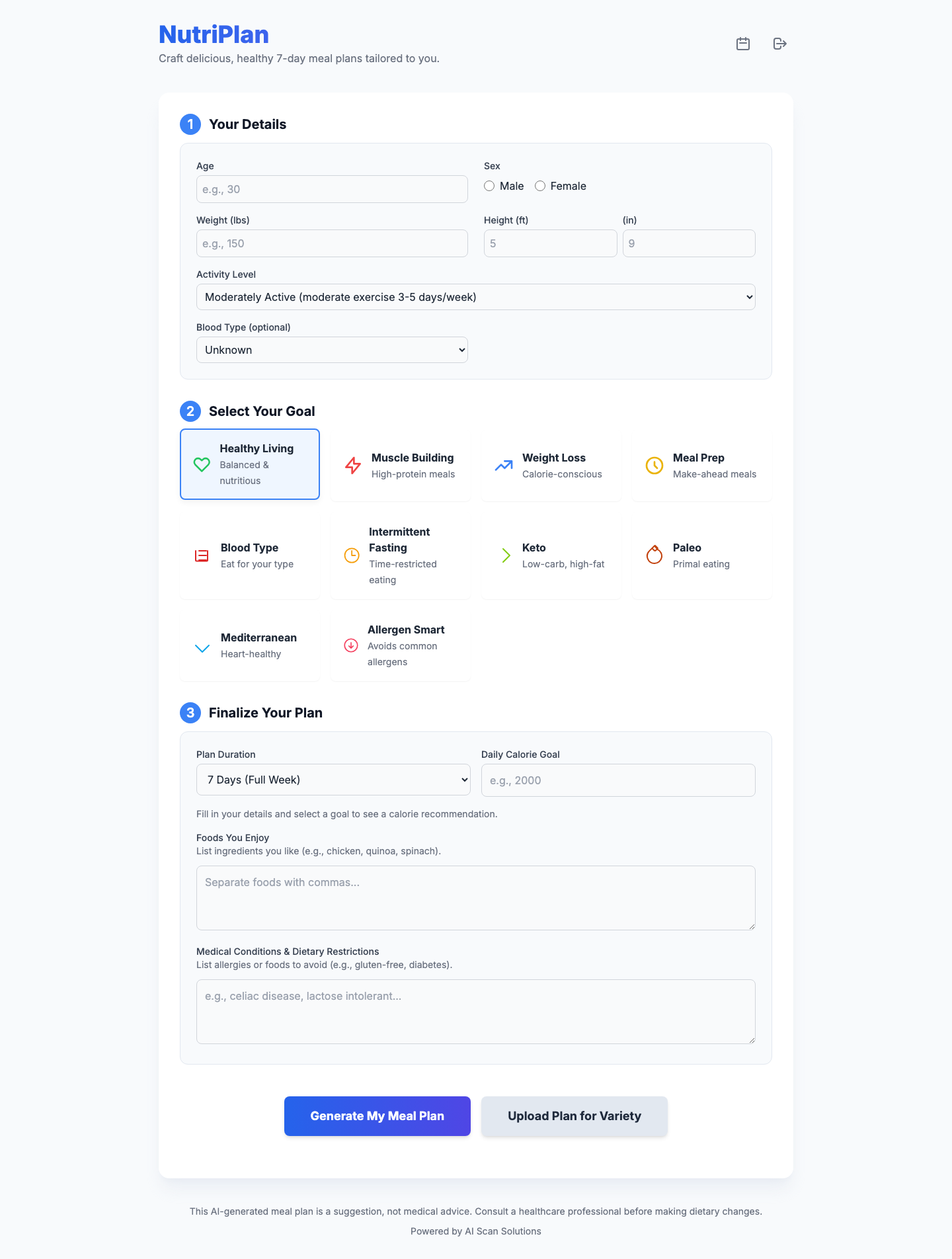
A useful clinical meal planner needs more than a food preference. The aiVitaPlan NutriPlan surface includes practical fields: age, sex, weight, height, activity level, blood type as an optional field, plan goal, plan duration, daily calorie goal, foods enjoyed, medical conditions, and dietary restrictions. Those fields help shape a draft that is closer to the patient's actual week.
The goal options in the product include Healthy Living, Muscle Building, Weight Loss, Meal Prep, Blood Type, Intermittent Fasting, Keto, Paleo, Mediterranean, and Allergen Smart. A practitioner can use those as planning categories, not as automatic prescriptions. The category helps draft a practical meal structure, while clinical judgment determines what should be used.
From supplement protocol to food routine
Supplement recommendations can fail when the patient has no routine to attach them to. A plan might say "with breakfast" or "with lunch," but if the patient's meals are inconsistent, adherence becomes harder. A meal plan gives the patient a rhythm. It can anchor supplement timing, hydration goals, and nutrition priorities in the same daily structure.
This is especially useful for clinics using aiVitaPlan Clinical. The supplement and nutrition protocol can be drafted from patient context, then the meal planner can help translate that direction into a practical plan. The practitioner still reviews the output, but the patient receives something easier to follow than a generic recommendation list.
Allergen and restriction handling should be explicit
Food preferences are helpful, but restrictions are more important. A clinic meal-planning workflow should ask what the patient must avoid, not only what the patient enjoys. The aiVitaPlan meal planner includes medical conditions and dietary restrictions fields, plus an Allergen Smart goal option. That supports a safer draft because the restriction context is visible at the point of generation.
As with supplement protocols, AI-generated meal plans should be reviewed. The software can draft options, but the practitioner decides whether those options fit the patient. This is especially important for patients with complex restrictions, significant medication considerations, or nutrition needs that require specialized care.
Why meal prep and duration matter
Patients often fail plans because the plan ignores the practical week. A seven-day meal plan gives structure, but some patients need a one-day example or a three-day ramp. Meal prep may be more useful than variety for a patient with limited time. The NutriPlan workflow supports plan duration and meal prep concepts so the practitioner can choose a realistic level of detail.
The product also includes recipe generation and pantry-style meal suggestions. In a clinic, these features are best used as convenience layers after the clinical direction is established. They help the patient turn the plan into real meals without making the recipe generator the center of care.
Where Pro+ Combo fits for nutrition and movement
Some clinics need nutrition planning and exercise-program support together. A chiropractic, rehab, or integrative practice may talk about supplement support, meal rhythm, and movement in the same patient journey. For those clinics, aiVitaPlan Pro+ Combo adds AI Rehab to the VitaPlan workflow.
Other clinics only need the clinical scribe and nutrition surfaces. In that case, VitaPlan Clinical is the starting plan at $49 per month with a 14-day trial. Pro+ Combo is $79 per month when AI Rehab belongs in the same subscription.
Meal plans should feed the follow-up loop
The first meal plan is rarely the final plan. Patients come back with feedback: breakfasts were easy, lunches failed, shopping was too expensive, or a restriction was harder than expected. A clinic workflow should make that feedback usable. The next plan can be adjusted from real patient experience instead of starting over from a generic template.
This is where scan history and journal context become useful. They help the clinic see what was generated before and what needs to change at the next visit.
What clinics should look for
When evaluating nutrition meal planning software, clinics should ask whether the tool fits into practitioner review. Does it collect useful patient details? Does it account for restrictions? Does it connect with supplement protocol drafting? Does it produce patient-facing output that can be reviewed and adjusted? Does it support follow-up instead of creating a one-time document?
Meal planning is most valuable when it makes the protocol livable. aiVitaPlan keeps meal planning close to the scribe, handout, scan history, and journal workflow so clinics can move from clinical context to a practical patient week without switching to a disconnected consumer tool.
For more on the handout layer, read Clinic-Branded Patient Handouts. For the broader protocol design, read AI Supplement Protocols.